May 10th, 2009 | Tags: , , ,

About a week ago Scott Drummonds from VMware Product Marketing posted an “anonymous” video on YouTube (see below) supposedly exposing an outage on TechNet/MSDN (MS Ops have already confirmed NO OUTAGES experienced as a result of Hyper-V see here) and a bug with Hyper-V consolidation (the guy at VMware seems to have run the test using virtual SCSI assuming this would achieve the best performance). Jeff Woolsey (Microsoft Program Manager for Hyper-V), took the opportunity to look into this in greater detail:

Day 1 : here Day 2 : here

Personally I think this shows us that VMware are nervous about Microsoft’s Hyper-V product and their rapidly evolving Virtualisation solution set, I would like to think there is enough space for both businesses to work together in this market – well for the next couple of years at least [;)]

The desperate attempt to expose a Hyper-V crash
May 8th, 2009 | Tags: , , ,

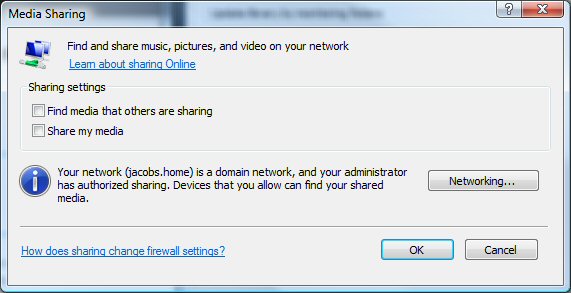
What some of you may or may not know is that consoles like the XBOX 360 and Sony PS3 all use a standard protocol for network media streaming. The name of this protocol is “DLNA” (Digital Living Network Alliance), essentially when you enable “share my media” in Windows Media Player this DLNA functionality is turned on (see below) and any devices supporting this form of advertising will automatically locate your shared media library.


There is one snag, both the XBOX 360 and Sony PS3 have limits on the amount of supported media types, but don’t worry help is at hand! Whilst WMP is a great media player, there are alternative DLNA servers that will perform real-time transcoding of unsupported formats. This is performed by intelligence that detects the destination digital media player and transcodes these unsupported files on-the-fly.

The best one I have found so far is TVersity, it is free (there is now a Pro version for HULU playback etc) and there are some great console specific guides here. One other digital media player I would strongly recommend is the Freecom MusicPal (a wired/wireless DLNA audio player) – my wife is a big fan and we have one of these in the kids play room so they can listen to their Barney Podcasts [:)]

May 8th, 2009 | Tags: , ,

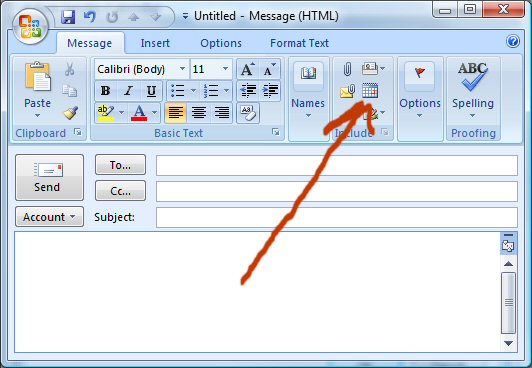
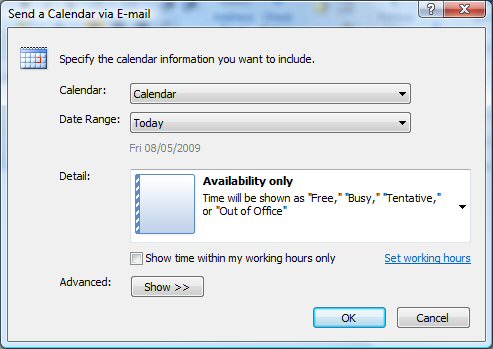
When you go for a “comfort break” the last thing you expect is to pickup a very useful, yet neglected feature of Office 2007. That was not the case when I last visited the Microsoft HQ in Dublin, whilst I initially thought the sight of loo technology tips was strange it actually worked out well!

One extremely useful tip that previously passed me by (even though it was staring me in the face) was the capability of adding your calendar availability information to an e-mail with two simple clicks. See illustrations below:

May 7th, 2009 | Tags: ,

Overview

Microsoft® Hyper-V™ Server 2008 R2 is a stand-alone product that provides a reliable and optimized virtualization solution enabling organizations to improve server utilization and reduce costs. With the addition of new features such as live migration and expanded processor and memory support for host systems, it allows organizations to consolidate workloads onto a single physical server and is a good solution for organizations who are consolidating servers as well as for development and test environments.

By having the ability to plug into existing IT infrastructures Microsoft Hyper-V Server 2008 R2 enables companies to reduce costs, improve utilization and provision new servers. It allows IT professionals to leverage existing patching, provisioning, management and support tools and processes. IT Professionals can continue to leverage their individual skills and the collective knowledge of Microsoft tools, minimizing the learning curve to manage Microsoft Hyper-V Server 2008 R2. In addition, with Microsoft providing comprehensive support for Microsoft applications and heterogeneous guest operating systems support, customers can virtualize with confidence and peace of mind.

    Note: This is a pre-release version of Microsoft® Hyper-V™ Server 2008 R2 and not intended to be used in a production environment.

Source: here

May 7th, 2009 | Tags: , ,

Just spotted a post over at Nick Whittome’s Blog that mentions Steve Riley has been hit by the second round of Microsoft layoffs. I met Steve back at last year’s Strategic Architecture Forum (SAF), he presented on “Privacy in the Digital Age” – deck here. I also managed to have an excellent debate with him and discussed security practices in my financial services organisation – he had some excellent perspectives.

Personally I would regard him as one of the finest speakers at Microsoft and I hope to see him again at other events. Steve’s Blog has moved here

Good luck Steve! (not that you need it of course).

May 5th, 2009 | Tags:

Welcome to Windows 7 Release Candidate (RC) testing. We’re on our way to Windows 7, and if you like trying out pre-release software, now’s your chance. You get to see what’s coming, and we get to see if our changes and fixes from the Beta testing are working correctly.

How do you test the software? You put it on your PC, and then do what you’d normally do. Your PC will automatically and anonymously send our engineers the information they need to verify the fixes and changes they made based on the Windows 7 Beta tests.

Here’s what you need to know:

This is pre-release software, so please read the following to get an idea of the risks and key things you need to know before you try the RC.

  • You don’t need to rush to get the RC. The RC will be available at least through July 2009 and we’re not limiting the number of product keys, so you have plenty of time.
  • Watch the calendar. The RC will expire on June 1, 2010. Starting on March 1, 2010, your PC will begin shutting down every two hours. Windows will notify you two weeks before the bi-hourly shutdowns start. To avoid interruption, you’ll need to install a non-expired version of Windows before March 1, 2010. You’ll also need to install the programs and data that you want to use. (Learn more about installing Windows.)
  • Protect your PC and data. Be sure to back up your data and please don’t test the RC on your primary home or business PC.
  • Tech details/updates: Before installing the RC, please read the Release Notes and Things to Know for important information about the release.
  • Keep up with the news. You can keep up with general technical information and news by following the team blog. And, you can get non-technical news, tips, and offers by subscribing to the monthly Exploring Windows newsletter.
  • Keep your PC updated: Be sure to turn on automatic updates in Windows Update in case we publish updates for the RC.
  • Installation: You can install the Windows 7 RC on a PC running Windows Vista without backing up the PC—but we encourage you to make a backup for safe keeping. If you’re running Windows XP or the Windows 7 Beta, you’ll need to backup your data, then do a clean installation of the RC, then reinstall your applications and restore your data. If you need to do a backup, please see How to back up your PC for more details and a suggestion for how to backup a PC running Windows 7 Beta or Windows Vista.

Continue at source.