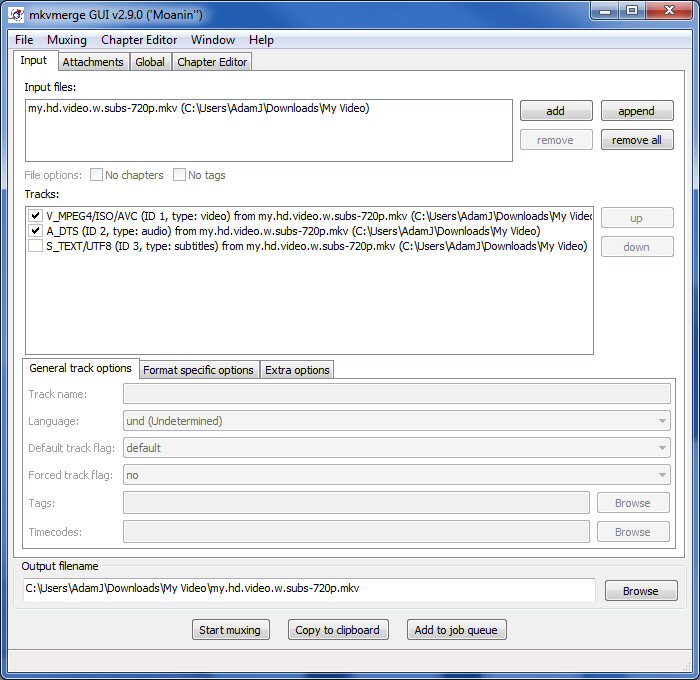
Easy, just use mkvmerge GUI (part of mkvtoolnix) and de-select the “S_TEXT” track – finally click “Start muxing” and voila!
0 comments
 I'm a UC Blog
Easy, just use mkvmerge GUI (part of mkvtoolnix) and de-select the “S_TEXT” track – finally click “Start muxing” and voila!
Whilst Windows 7 has more codecs than any version prior (yes – you can open DIVX natively), you will still need to find codecs for more advanced video/audio encoding. This is usually achieved by installing a “codec pack”, a bundle of codecs usually tested to be installed and run concurrently.
This does not always turn out to be the case, as they are comprised of many open source tools and sometimes spyware too. I previously blogged about TVersity, a freeware DLNA server used to stream supported and unsupported video to clients like the PS3 or XBOX 360, this unsupported media is handled by transcoding on-the-fly and needs codecs – hence my Windows codec predicament.
So codec pack testing commenced and my recommendation is the Shark007 Win7codec pack, this was the least disruptive I found.
Taken from Shark 007’s site:
“The Win7codecs package which I have created does not change or interfere with what Microsoft has going on concerning native codec support in Windows Media Player 12 and Media Center.
DXVA accelerated H264 playback is provided by the codec package for all other capable players.”

The Exchange Team have just posted an interesting article detailing changes to the UM out-of-box experience, previously Exchange 2007 would not only handle inbound fax lines but also generate the fax message destined to the recipient.
It seems that in Exchange 2010 they have opted to remove this basic functionality and allow 3rd parties to integrate their own solutions, whilst this is a shame I can understand that the requirements around this feature can become quite in-depth and needs more than just a basic fax-to-e-mail approach.
Source: here

I kid you not, my wife works from home and uses a MacBook to connect to an Exchange 2007 Server – girls like “pretty” computers what can I say? As Mac OS does not use Outlook (in 2010 this will all change with the new release of Office for Mac), you have to use Entourage and previously it only supported WebDAV.
This resulted in my wife yelling at me daily, ringing during business meetings and shouting about errors like “HTTP error the post data is too large”, I tell her “Maybe I should put Windows 7 on the Mac?”
Entourage EWS has changed my life, literally…no more moans, yells or disruptions (about Entourage anyways). If you have a Mac and Exchange, install it now!
Good news, not only is Exchange 2010 release candidate available for download but the Exchange team have committed to the capability of being able to upgrade to RTM upon release, another little mention is a dependence on Exchange 2007 SP2 for co-existence with 2010 due for release later this month.
Taken from the Exchange Team Blog:
Today, we’re happy to announce that Exchange Server 2010 Release Candidate is feature complete and available for download here. Crystal Flores tracked me down with her roving cameraman to outline how Exchange Server 2010 delivers unmatched Inbox innovation to the enterprise to improve user productivity, and exceed IT requirements around ease of deployment, compliance and administration. Hope you enjoy watching!
When we shipped the first version of Exchange about fourteen years ago, IBM/Lotus dominated the space. According to a 2008 Ferris research report, Notes/Domino share has dwindled to a mere 10% in enterprises, while Exchange has grown to 65% market share across all organizations and continues to grow with more than 4.7M starting the switch to Exchange last year. In fact, Exchange is now is approaching $2B in annual revenues. If Exchange were a standalone business, it would be the 9th largest software company in the world. We expect that momentum to accelerate with Exchange 2010, the most compelling version yet.
On the services front, Exchange Online is getting a great reception from customers and is now used by more than a million people. With Exchange 2010, we’ve broken new ground again. Exchange 2010 is currently being tested as a service by more than 10M people worldwide in the broadest server beta in Microsoft history. This is a testament to our long-standing commitment to bring rock solid, enterprise-ready products to market.
It doesn’t stop there. With Exchange 2010, people have an arsenal of new weapons to fight inbox overload. In fact, Basex have awarded Microsoft (for Exchange 2010) a Basex Excellence Award, aka the “Basey” award. Last week, on “Information Overload Day”, Basex presented the award to acknowledge the significant contributions Exchange 2010 makes to minimizing information overload – with features like MailTips and Ignore Conversation. We think is pretty exciting given the product isn’t even generally available yet.
All of that aside, I want to highlight a couple of interesting new things in the Release Candidate:
· Support for Windows Server 2008 and Windows Server 2008 R2: The Exchange Server 2010 Release Candidate is now supported on the 64-bit versions of the Windows Server 2008 and Windows Server 2008 R2.
· In place upgrade from Exchange Server 2010 Release Candidate to Exchange Server 2010 RTM: You can start planning and deploying your Exchange Server 2010 environment today knowing that it will be possible to perform an in place upgrade with the final version expected to be available later this year. You won’t need to reinstall your servers or reconfigure your Exchange settings once you have deployed the Release Candidate. This will save you time while allowing you to start evaluating the latest product capabilities now.
· Co-existence with Exchange Server 2007 and Exchange Server 2003: If your current environment is Exchange Server 2007 or Exchange Server 2003, Exchange Server 2010 Release Candidate is able co-exist with either of the two versions. This will enable you/your company to start planning your upgrade, test critical scenarios and experience the benefits of the latest version of the product. For Exchange Server 2007 co-existence, Service Pack 2 (SP2) is required, and will be available later this month.
For additional technical details, please visit “What’s new in Exchange 2010” on TechNet.
As always, let us know what you think!
~Michael Atalla
Source: here