August 23rd, 2009 | Tags: , ,

If you are looking to Virtualise within Windows 7 look no further than Virtual PC, this brings some of the goodness from Hyper-V to the desktop and as with it’s bigger brother requires Intel VT or AMD-V CPU instructions to be enabled in your BIOS (if you don’t have this and you need to Virtualise then buy a better machine or go and use VMware)

Windows Virtual PC for Windows 7 is available now as a release candidate, but as with the previous Hyper-V beta it is very stable and feature complete (Hyper-V beta was actually shipped with Windows Server 2008 RTM don’t you know?). However, this product alone will not give you the Virtual application publishing required to sandbox a browser, for this you need “XP Mode”, also available in release candidate form.

Before I explain how to blend these two products I want you to understand the benefits of isolating your web browser AKA “sandbox”. When you sandbox a computer application it provides a layer of isolation and therefore a security mechanism for separating running programs. It is often used to execute untested code, or untrusted programs from unverified third-parties, suppliers and untrusted users. The sandbox typically provides a tightly-controlled set of resources for guest programs to run in, such as scratch space on disk and memory. Network access, the ability to inspect the host system or read from input devices are usually disallowed or heavily restricted. Another good example of when “to click or not to click” is whilst browsing links that have been put through URL shortening services such as “bit.ly“, this has become increasingly more popular on Twitter – (Tweets are restricted to 140 characters).

Now how do you do it?

First you need to enable Virtualisation in your BIOS (read here for more information), then install Virtual PC, finally install XP Mode from here.

Once the installation is completed you need to look at Virtual application publishing, a “Virtual application” is an application installed within a VM that can run in a seamless way as if the application were installed on the host computer’s operating system.  The user would not necessarily be aware of the existence of underlying VM on which the application is running.

To publish Internet Explorer 6.0 (or any other XP mode application):

  • On the virtual machine desktop, open the command prompt.
  • On the command prompt, execute:  Copy “%USERPROFILE%\Start Menu\Programs\Internet Explorer.lnk” “%ALLUSERSPROFILE%\Start Menu\Programs”
  • One (1) file should get copied.
  • Wait for a few seconds and verify that IE6 is now published on the host (Windows 7) computer.
  • Log‐off and close the virtual machine window.
  • You can now use IE6 from your Windows 7 start menu.

Windows Virtual PC publishes only applications that are installed in the All‐User profile and Internet Explorer 6 (“IE6”) is installed in a per‐user profile, therefore as detailed in the steps above you are required to copy the shortcut to the “all users” start menu.

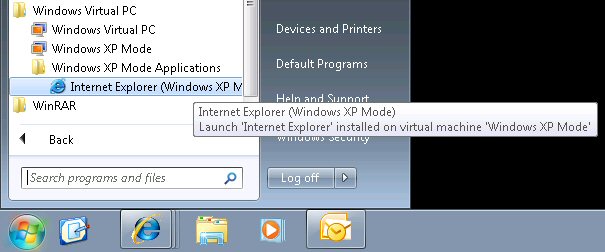
Once completed “presto”, you should find a shortcut automatically created in your Windows 7 start menu (full location illustrated below)  – this shortcut can then be copied to your desktop or even pinned to your taskbar.
Modality Systems has created an OCS application for the iPhone named “iDialog”, this is now available via your local AppStore.

What is iDialog?

Microsoft Office Communications Server is revolutionizing the way workers communicate and collaborate.

iDialog is an exclusive product from Modality Systems that enables users to find and communicate with their Microsoft Office Communications Server (OCS) contacts using Apple iPhone or iPod Touch devices.


Find your Contacts

iDialog provides users with the same contact list they have when using the Microsoft Office Communicator client on their PC or laptop. Now it’s easy for users to see information about the presence of their contacts and make appropriate communications decisions. In addition, the Directory Search feature allows users to search for contacts in the corporate Global Address List and see information about the contacts, in-line with the privacy settings built into the Microsoft OCS platform.


Communicate Effectively

Using presence to see a contact’s availability, it’s easy to determine the most effective way to communicate with someone. iDialog enables users to start an Instant Messaging (IM) conversation or send email to a contact directly from their iPhone or iPod Touch. iPhone users also have the option to initiate a phone call.

Multiple IM conversations can be handled simultaneously and any IM conversation can support multiple participants. This is especially useful if you need to reach your team or collaborate with a group of people on a key task.


Manage Communications

When a user is signed-in to iDialog, they can manage their presence status and control multiple channels of communications. In addition to sending and receiving Instant Messages, a user can control incoming phone calls to their OCS endpoint. iDialog does this by alerting the user to the incoming call and providing the option to forward the call to their mobile phone, voice mail, or another device.


Deployment Requirements

iDialog is supported on Apple iPhone and iPod Touch versions 2.0 and higher. The user must also have an account that can sign-in to a corporate or hosted OCS 2007 or 2007 R2 system. An OCS Communicator Web Access (CWA) Server must be deployed to support iDialog connectivity. No proprietary server infrastructure is required.

Source: here

August 22nd, 2009 | Tags:

A number of benefits can be realised with the take on of Vitualisation in the data centre, but with this comes a number of shortcomings. These issues are discussed and potentially addressed in a paper published by Microsoft Research.

Taken from Computerworld:

Microsoft’s researchers also addressed VM migration and Layer 2-like addressing but using a method that calls for installing an agent on every endpoint, which contrasts with the UCSD group’s plan to tweak switch software and leave the endpoints alone.

The UCSD effort led by Amin Vahdat, a professor of computer science, proposes a blend of Layer 2 and Layer 3 connectivity for data centers that enables massive scaling that is otherwise limited by Layer 2 factors and reduces the management and configuration demands of Layer 3.

They say their PortLand protocol could support a data center network of 100,000 servers without modifying any of the host machines. The group presented its findings in the research paper “PortLand: A scalable Fault-Tolerant Layer 2 Data Center Network Fabric”.

Making the addition of devices to the network plug-and-play — with no configuration or modification of end devices — was a key goal of PortLand, Vahdat says.

It would support VM migration, something Layer 3 can’t do because VMs can move from server to server, each with a different IP addresses. It also introduces a flat mechanism for sharing PortLand-assigned media access control (MAC) addresses that overcomes the memory limitations of most switches by reducing the size of the address tables each switch has to store, Vahdat says.

PortLand requires additional software that enables switches to discover their place in the data center topology. The software also enables switches to assign a pseudo MAC address to each device that is directly connected to them.

Under PortLand, switches maintain tables of PMAC prefixes and forward traffic to the appropriate switch until the traffic reaches the switch the destination device is attached to. That switch translates the PMAC to the actual MAC so the traffic can be delivered to the correct device, Vahdat says.

To facilitate forwarding traffic, PortLand includes a Fabric Manager server, which performs a function analogous to a DNS server in resolving URLs with IP addresses. Rather than broadcast for address resolution between PMACs and the IP addresses, switches redirect broadcast ARP requests from their connected hosts to the Fabric Manager, which replies with the appropriate IP address.

Fabric Manager maintains a soft state of the network so if it crashes, it can reconstruct the address information from access switches in the network using the PortLand protocol.

If Fabric Manager crashes, the time to continue communication on the network is negligible because the protocol reverts to broadcasting for address resolution, Vahdat says. If Fabric Manager is operating, the lookup runs at wire speed.PortLand also respects the line drawn between devices network administrators control and the hosts controlled by system administrators. Rather than modifying the host MAC address directly using an agent and a server, the PortLand architecture has the switches translate MAC addresses to PMAC addresses. “We let the end host be what it is and make just small changes to the switch software and no changes to the switch hardware,” Vahdat says.

Microsoft’s scheme

Microsoft’s team, led by Albert Greenberg, David Maltz and Parveen Patel, also deals with the addressing problem by introducing a two-tiered system, a location-specific IP address and an application specific IP address that follows applications around as they migrate to new VMs.

Under the Microsoft VL2 architecture, each server is associated with the location-specific IP address of the switch it is attached to. As with PortLand, a VL2 directory system maps the location IPs to the application IPs. A VL2 agent on each server retrieves the location-specific IP address of the switch nearest the destination server and encapsulates application packets inside it.

Deploying an agent and configuring servers is something PortLand avoids. But VL2 has other features that PortLand doesn’t address. For example, VL2’s directory server can refuse to provide the location-specific IP address if access policies deny the initiating server connectivity to the destination server. This gives VL2 the ability to enforce access control.

Microsoft’s researchers go beyond the ambitions of PortLand by looking at data center traffic patterns and designing a network topology that chooses paths for each traffic flow in a manner that avoids persistent congestion hot spots and provides uniform high capacity between any two servers in the data center.

VL2 calls for a layer of highly integrated aggregation switches with so many connections to a higher layer of intermediate switches that in the event of a failure, performance degrades gracefully, the Microsoft researchers say.

Source: here

August 21st, 2009 | Tags:

Taken from The Exchange Team Blog:

Microsoft Learning has created a series of Learning Snacks to help satisfy your hunger for more knowledge.  Learning Snacks are short, interactive presentations about popular topics created by Microsoft Learning experts. Each Snack is delivered by using innovative Microsoft Silverlight technology and includes various media, such as animations and recorded demos. At the end of each free presentation, you can view more Snacks, learn more about the topic, or visit a related Web site.

Check out these Exchange 2010 learning snacks:

Continue at source

August 20th, 2009 | Tags: ,

An upgrade is available to those running Microsoft’s new beta Anti-Virus product “Microsoft Security Essentials”. To update your software click Help -> Upgrade Microsoft Security Essentials.

Source: here

August 19th, 2009 | Tags:

In case you had forgotten…

Source: here