November 9th, 2009
| Tags: Exchange 2010

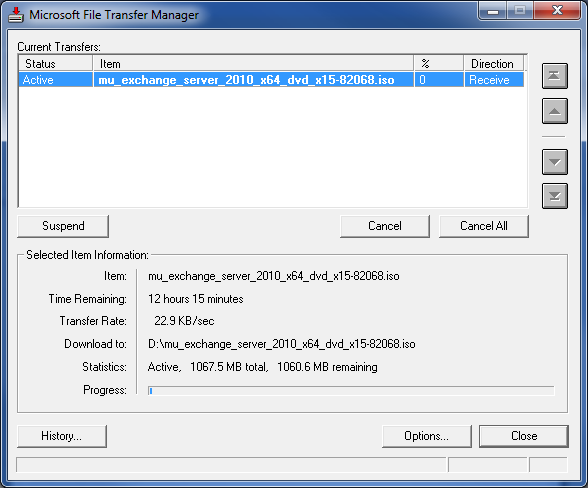
Heads-up! Exchange 2010 has just been released to web. I’m currently downloading it from TechNet, but by the looks of it so is everyone else.
0 comments
 I'm a UC Blog
Heads-up! Exchange 2010 has just been released to web. I’m currently downloading it from TechNet, but by the looks of it so is everyone else.

Every now and then an amusing exploit surfaces in the world of computing, this one is by no means an exception. If you have a Jailbroken iPhone and installed SSH, you should change the default SSH password or you too could find your Jesus phone wallpaper changed to none other than 80’s pop icon Rick Astley.
Brilliant!
Source: here

Yesterday I attended a UK Unified Communications & Exchange user group meeting (thanks to Nathan and Russ for setting this up, definitely time well spent!) The kind folks at Microsoft hosted the event at the London, Victoria offices.
Astrid McClean (Exchange TPM) and Yancey Smith (OCS DPM) stopped by on their way through to TechEd Europe and unfortunately they brought their NDAs with them – but wait there are a few Exchange 2010 titbits worth sharing… (in no particular order)
Exchange Control Panel (ECP)
A lot of effort has gone into developing a new web based UI for both end users and service desk administrators, allowing delegation of common Exchange chores. This web based console can either be accessed via Outlook 2010 or directly in a web browser via https://hostname/owa/ecp typo this should acually read https://hostname/ecp (thanks to Arman for spotting this grave error!). The ECP shares OWA code, but is a separate application.
Other noteworthy features include:
· Creation and modification of distribution lists with built in workflows for approvals (the Exchange 2010 arbitration engine is much improved and supports Outlook 2007)
· Joining distribution lists also via workflow
· Message tracking
· Modification of user details (e-mail address, telephone numbers etc.)
· Ability to set “Out of Office” for other users – yay!
Exchange Management Console (EMC)
· Ability to execute more PowerShell Cmdlets i.e. archiving and high availability
· Select multiple mailboxes for bulk updates (happiness resonated amongst the user group guys)
· Role based access control (RBAC) which makes it easier to delegate and customise the UI
· Manage multiple Exchange forests (hybrid management)
· PowerShell script visibility, not per execution but view all previously run tasks
Exchange Management Shell (EMS)
As the Exchange team decided on restricting remote administration tools to x64 clients (a few gasps were heard amongst the user group folks, myself included!) improvements to PowerShell are evident. Astrid mentioned that by making the decision to completely drop 32bit code regression testing was cut in half, she went on to state that “a change in this decision is unlikely, but not impossible”.
Other pointers:
· The shell is now “Firewall friendly” – connectivity is over HTTP/HTTPS
· The shell can be run remotely without a local install of Exchange 2010 Cmdlets
· All PowerShell executions are logged
Other miscellaneous Exchange nuggets worth mentioning:
· Exchange 2010 has much better compliance controls
o “User hold” option allows full auditing of a single user
o By using the discovery mailbox and defining key words your compliance officer can view suspect activity without granting full rights to specific user mailbox
· RBAC consists of 60+ out of the box role groups and you can pick and choose which ones to assign depending on specific administrative tasks, these can be customised further via PowerShell
· Adoption of PowerShell and ECP are pretty much mandatory for administrators running 32bit clients (otherwise RDP is your friend, but far from ideal)
Interesting Exchange 2010 facts:
· The Exchange 2010 Operations Manager management pack contains a default logo in the top left hand corner of any reports, this can’t be changed and was spotted after RTM – this is confirmed to be addressed as a high priority in SP1!
· The ability to create mailboxes within ECP was included and dropped when the developers realised that there was no easy way of setting/modifying permissions without a lot more coding
· Finally Exchange 2010 is scheduled to go general release on Monday, this will coincide with the Exchange launch at TechEd Europe
The second half of this meeting was NDA’d and focussed on the next release of OCS. There are a few things that I can say as they are either “Bingable” or non-sensitive.
· The next release of OCS is currently referred to as “OCS Wave 14” or “OCS W14”
· OCS W14 is scheduled for release in 2010
· This will be followed (logically) by Wave 15
· In September 2009 Microsoft sent over 76m IMs via OCS
· Surprisingly Microsoft has not yet deployed an XMPP federation (perhaps for compliance reasons?)
· OCS Wave W14 looks, how can I put it? Fantastic!
Well that is all I can say folks, for those attending TechEd I’m sure there is much more information to come, thanks again to Nathan and Russ for facilitating the evening.

In a recent letter written by Google addressed to the FCC, formatting errors uncovered by Business Week reveaved:
Google has signed contracts with a number of “international service providers for inputs to Google Voice.” followed by the statement that “none of the contracted services have yet” been launched”.
It is good to see that Google Voice is destined for use outside of the US, but where and when is still to be confirmed (or leaked!)
Source: here
The Exchange Team is listening, a statement made on their blog confirms that support for Exchange 2007 installed on Windows Server 2008 R2 wil be delivered via an update (release date to be confirmed).
Taken from the Exchange Blog:
We always talk about listening to customers and sometimes this is written off by many as ‘marketing speak’. In fact, we do take feedback seriously and no input is more important to our engineering processes than your voice.
Earlier this year we made a decision in one direction, and due to the feedback we have received on this blog and elsewhere, we have reconsidered. In the coming calendar year we will issue an update for Exchange 2007 enabling full support of Windows Server 2008 R2. We heard from many customers that this was important for streamlining their operations and reducing administrative challenges, so we have changed course and will add R2 support. We are still working through the specifics and will let you know once we have more to share on the timing of this update.
So, keep the feedback coming. We are listening.
Source: here

When I am out of the country I often use various VoIP technologies to avoid the hefty international/roaming charges levied when abroad. However, sometimes I am without WiFi or a Skype enabled device and need to call home.
Skype offers a service called “Skype-in” which provides a personal landline number in a country of your choice, the disadvantages are both cost and a limit on 25 countries. Where as a new service provider “Ring2Skype” provides a bridge number in 100+ destinations with a personalised extension that routes into the Skype network – at no cost.
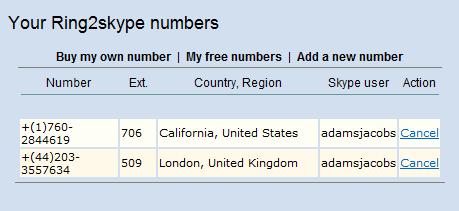
As you can see below I have setup both a US and UK based extension that permits me to use local phones at lower cost (sometimes in certain countries like the US, local calls are free).
If you are thinking of travelling or have friends or family abroad (without a computer – yes they do exist) I recommend you give it a try, we’ll see if it stays free…
Source: here (thanks to Tom Keating for the heads-up)