August 17th, 2009 | Tags: , ,

I’m guessing that if you are reading my blog you are technically minded or as others call it (a-geek) therefore I would like to make a profound statement “everybody should have an Exchange Server at home”.

Now before you think I have completely lost the plot let me recite my evidence:

  • Microsoft has already launched a home server product aptly named “Windows Home Server”, for the purpose of hosting media content, centralised home backup, remote access and document management.
  • Mass market “consumer” mobile phones have become smart phones, i.e. iPhone, Windows Mobile, BlackBerrys etc and they all want to feed from a centralised mailbox
  • Webmail, we all want enterprise strength web access with near-Outlook functionality (because we have seen that it exists by using it at work)
  • Unlimited storage, I know Hotmail offers 5gb but do you really want to be restricted given the fact that you are taking pictures and movies via your mobiles?
  • Remote access to your home voicemail aka “home call director”
  • Anti-spam, anti-virus – do I need to say more?

This is to name just a few higher-level reasons, bottom line is that most consumers want to have the same experience at home as they do within the enterprise (albeit with less restrictions). So imagine a cut down, easy to install and configure “Exchange Home Server”?

Summary of features would include:

  • Out-of-the-box iPhone, Windows Mobile & BlackBerry connectors (with an easy SSL configuration wizard)
  • Outlook web access via dynamic DNS
  • No static IP required because it would just download POP-3 from your e-mail provider
  • Forwarding your e-mail to your ISPs SMTP relay service (to get around spamhaus etc. dynamic IP mail relay blocks)
  • Off-site backup (cloud based?) – I’m sure the folks at Carbonite would be happy to write an agent
  • Unified communications via a PSTN SIP device, giving callers an ACD-like call direction service with “follow-me”
  • Built-in Forefront for anti-virus and anti-spam control

So come on Microsoft think of slotting a product in-between Hotmail and Small Business Server?

August 16th, 2009 | Tags:

Overview

Web Scheduler is a resource kit tool for Microsoft Office Communications Server 2007. It provides a Web-based alternative to the add-in for the Microsoft Outlook messaging and collaboration client for the purpose of scheduling a meeting using Office Communications Server 2007. It also provides a browser-based conference management experience that includes operations such as:

  • Scheduling a new Live Meeting conference or conference call.
  • Viewing and modifying details of an existing conference.
  • Listing all existing user schedules of a Microsoft Office conference.
  • Deleting an existing conference.
  • Sending an e-mail invitation to conference participants by using a configured SMTP mail server.
  • Joining an existing conference.

Download here

August 16th, 2009 | Tags: ,

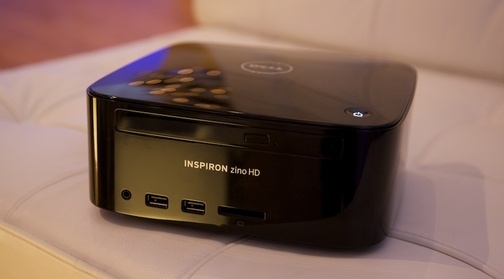
The hunt for the best PC to put beneath your TV is constantly evolving and Dell’s Zino HD (quite a similar name to the Zune HD and looks of a Mac Mini – strange?) may be the perfect solution. No specs yet but as the name suggests it does include an HDMI port at the back.

Source: here

August 16th, 2009 | Tags: ,

Old habits die hard and this one is no exception!

In Windows 7 the show desktop button is located on the far right of your taskbar and now includes “Peek at Desk” (aka Aero Peek.). Personally I find my cursor is usually floating around the left of the screen and would prefer to have my old “Show Desktop” icon back (certainly until I make the transition).

If this is of any interest “Tweaking with Vishal” has the answer here. The other alternative is “Windows key + D”.

August 15th, 2009 | Tags: ,

Taken from Techflash:

“Brian Seitz from the Zune team giving an extended demonstration of the Zune HD, including a quick look at its minimalistic web browser, which offers a search field powered by Microsoft Bing. The key question is whether the revamped Zune will be enough to give Microsoft any real traction against the iPod.”

August 13th, 2009 | Tags:

It seems that Mary-Jo Foley wouldn’t rule this out and she does bring interesting arguements to the table:

  • Exchange 2007 will not be supported on Windows Server 2008 R2 (now available to business customers with software assurance)
  • The Exchange team has said to expect the product to RTM before the end of 2009
  • More recently, company officials said to expect Microsoft to “launch” Windows Server 2008 R2, Windows 7 and Exchange 2010 together

As usual when Mary asked a Microsoft spokesperson she was told:

“We have said that Exchange 2010 will become available in the second half of 2009. There’s nothing additional to share at this point.”

Source: here